Welcome to LinkQR
ONE SCAN. ONE PAGE. YOUR WORLD.
Make your idea
impossible to miss.
A website can take time and money. LinkQR helps you bring your story, products, photos and contact details together on a beautiful page you can create from your phone.
Your visitors open the page in a browser. They do not need the app.
Your next big idea
One page to bring it all together
A BETTER FIRST HELLO
More than a link. A place to be discovered.
Someone hears about your work. What happens next? Give them a page that shows who you are, what you offer and how to reach you—without asking them to search across different platforms.
WHY LINKQR EXISTS
A digital presence should be within everyone's reach.
A good website can be expensive to build and maintain. LinkQR gives people a simpler way to present their activities online: create a page from a phone, then share it with one link and one QR code.
You decide what to show: your identity, story, work, products, services and ways to connect. You can update the page yourself as your plans change.
A page is a starting point, not an audience by itself. Share your link, print your QR code and keep telling people about what you do.
From a sidewalk seller to a larger shop, a community organizer, artist, faith group or public initiative: if you have something to present, you can make a page for it.
THE METHOD
From idea to shareable page
Make a start in minutes. Build it at your own pace, then publish when you are ready.
01Create
Open the LinkQR app and give your page a name and identity.
Read the guide
Install LinkQR, register with an email address you can open, and create a password of at least eight characters. Accept the terms and open the confirmation email; tap its link to verify your account, then return to the app and sign in.
The app then asks you to set up two-step verification. Install an authenticator app such as Google Authenticator or Authy, scan the setup QR (or enter the key) and type the six-digit code it generates. Keep access to that app: it is required when you sign in again.
02Make it yours
Add a banner, photos, products, links, contact details and your story.
Read the guide
Give the page a clear name and description. Add a recognizable logo and a banner prepared for its frame. Complete the useful fields: contact details, social links, albums, products, services and appointments as they apply to you.
A mobile banner should be at least 960 × 540 px, roughly 16:9. The optional desktop banner is very wide: at least 1200 × 120 px, with a width-to-height ratio between 8:1 and 12:1. Each original banner must be under 12 MB. Check the preview and adjust your crop before saving.
03Preview & publish
See how your page looks. LinkQR Pro lets you publish it for visitors.
Read the guide
Open the preview on a phone and a larger screen. Check that no faces, logo or important words are cut off, that text is readable, and that each link and contact method is correct. If a section feels empty, improve its content before publishing.
Publishing a public page requires LinkQR Pro. After you publish, test the public link in a browser that is not signed into your account. Your page and its QR code are then ready for visitors.
04Share
Send your link or put your QR code on a flyer, card or social post.
Read the guide
Copy the public link and download or share the page QR code. Put it on your business card, shop counter, packaging, flyers, event posters and social profiles where it makes sense.
Scan a printed test copy before distributing it. The QR code opens the page; your own outreach gives people a reason to scan. Update the page when an offer, schedule or contact detail changes.
LEARN BY WATCHING
See every step, from account to QR code.
Follow a practical walkthrough of LinkQR on a phone. Pause whenever you need to and build your own page alongside the guide.
- Create and verify your account, then set up your authenticator app.
- Add your banner, logo, description, contacts, albums and products.
- Preview, publish with LinkQR Pro and share your page QR code.
YOUR PAGE, YOUR POSSIBILITIES
Everything important, together.
Give each visitor a clearer picture of your work and a simple next step.
Your identity
Make a memorable first impression with your name, logo, banner and introduction.
Read the guide
Use the same name and visual identity people already recognize. A good logo and a carefully framed banner make the page feel complete; your introduction explains whom you serve and why.
Photo galleries
Let your images show the people, projects and moments behind your work.
Read the guide
Choose images that tell a story. Keep the galleries focused and use the appropriate landscape or portrait album for each photo. Clear photos help visitors understand your work without a long explanation.
Products
Organize products by category, with a name, price and description. Interested visitors can contact you.
Read the guide
Add product images, categories, names and prices. Visitors can open a product for its description and contact you about buying it. This version does not include a checkout on the public page.
Appointments
Give visitors a way to request a time with you and manage requests in the app.
Read the guide
Let visitors request an appointment through your page. Review and confirm requests in the app; keep your availability and contact information current so the next step stays clear.
Ways to connect
Bring your contact information, social channels and useful links into one place.
Read the guide
Check that your WhatsApp number, email and social URLs really work. Put the most useful channels first. A page that is easy to contact is easier to act on.
One QR code
Turn a printed card, sign or poster into a direct path to your page.
Read the guide
After publishing, use the QR code linked to your page on physical and digital materials. Print it at a readable size with enough clear space around it, then test it with another phone.
MADE FOR YOUR AMBITION
Business is only the beginning.
LinkQR is a home for anyone with something meaningful to present.
01Merchants & makers
Present collections, prices and the people behind your products.
Read the guide
Whether you sell from a small street table or a large store, show what you offer, the prices people need and the easiest way to reach you. Your page can grow with your business.
02Services & professionals
Explain what you do and make it easy to request an appointment.
Read the guide
Present your practice or services with examples, contact details and an appointment request. Help a new client know what you do before they call.
03Community & culture
Share a program, initiative, exhibition or event with a wider audience.
Read the guide
Promote a cultural event, association, educational program or neighborhood initiative. Give the program, photos, dates and contacts a shared destination.
04Faith & social projects
Give your mission, activities and contacts one clear destination.
Read the guide
Bring a congregation, charity or social project together around its mission and activities. You can also show a product or fundraiser when it belongs to your work.
THE LINKQR CHALLENGE
What could one scan open for you?
Pick one thing you want people to discover. Build the first version of your page around it. Then share it with someone who has never heard your story.
Start the challenge01Choose your story
Choose the person you want to reach and the one thing you want them to discover. Build a page that answers their first questions.
02Create your first page
Show the page to someone unfamiliar with your work. Ask what is clear and what is missing; improve it before printing anything.
03Show it to someone new
Share the link, place your QR code where your audience will see it, and keep the information fresh. One scan opens your page; consistent promotion brings the scans.
No coding. No website setup. Just a clearer way to be seen.
GO FURTHER
Useful ideas for the page you are building.
Build at your own pace, learn how to present your work, then tell us what we can improve.
LINKQR
One scan can open your next connection
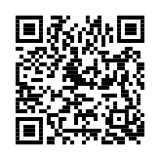
This QR code leads to the LinkQR app page. After publishing, your own page gets its own QR code to share and print.
Discover the appGOOD TO KNOW
Questions before you start?
Do visitors need to install LinkQR?
No. A published page opens in a regular browser from its link or QR code.
Do I need a website or coding skills?
No. Create and manage your LinkQR page in the mobile app.
Can customers pay for a product on the page?
The page presents products and prices. Visitors can contact you to discuss a purchase; direct checkout is not part of this version.
How do I publish my page?
Create and preview your page in the app. Publishing and sharing your public page require LinkQR Pro.
Why do I need an authenticator app?
LinkQR requires a six-digit code from Google Authenticator, Authy or another authenticator app to protect your account after sign-in. Keep access to that app so you can sign in again.
Will a QR code promote my page by itself?
No. The QR code opens your page when scanned. Put it where your audience will see it and promote your work through your own channels.
YOUR NEXT CONNECTION STARTS HERE
Give your idea a page worth sharing.
One scan can introduce a customer, a supporter or a new opportunity to what you do.